At month end, check cross-branch settlement in four passes: list every session redeemed at a branch other than the one that sold the package, confirm each session came off the right package, confirm the sales commission stayed with the seller and the hands-on commission went to the therapist who served, then settle between branches using a rule agreed before the month started. MyBMS Pro routes sales and hands-on commission automatically when a package bought at Branch A is redeemed at Branch B, and generates a cross-branch settlement report, so month end becomes a review instead of a rebuild from notebooks and chat messages.
Why month-end cross-branch checks go wrong
Take a customer, Mei. She buys a facial package at Branch A from consultant Lina. Two weeks later she moves house and starts coming to Branch B, where therapist Aina does her sessions.
Without one shared record, Branch B writes the sessions on paper or in a chat group. Branch A only finds out at month end. Then the questions start: how many sessions did Mei use at Branch B? Was any session counted twice? Who should get paid for what?
Common signs your month-end check is not working:
- Sessions are counted twice or not at all. Each branch keeps its own list, and the lists never quite match.
- Commission goes to the wrong person. The seller at Branch A and the therapist at Branch B both claim the same session, or neither does.
- Branch managers argue about who owes whom. Without an agreed rule, every month is a new negotiation.
- The package balance is different at each branch. The customer is told one number at Branch A and another at Branch B.
The hardest cross-branch settlements are the ones that only start at month end. I advise owners to write the rules down in advance: who sold, who served and what each person earns. Month end should be a check against the report, not a new argument every month.
William Tang, Founder, MyBMS Pro
Agree the settlement rule before the month starts
The report can show what happened. It cannot decide who gets the money. That is a business rule, and it should be written down before the month begins, not argued about after it ends.
Decide three things with your branch managers:
- Which branch keeps the sale when a package is sold at one branch and used at another.
- How the serving branch is credited for the sessions it performed for another branch’s customer.
- Who signs off the monthly settlement, for example HQ or the owner.
Once the rule is clear, the monthly check is only about whether the records are correct. For why the split matters in the first place, read cross-branch package redemption: buy at Branch A, redeem at Branch B.
How to check the cross-branch settlement, step by step
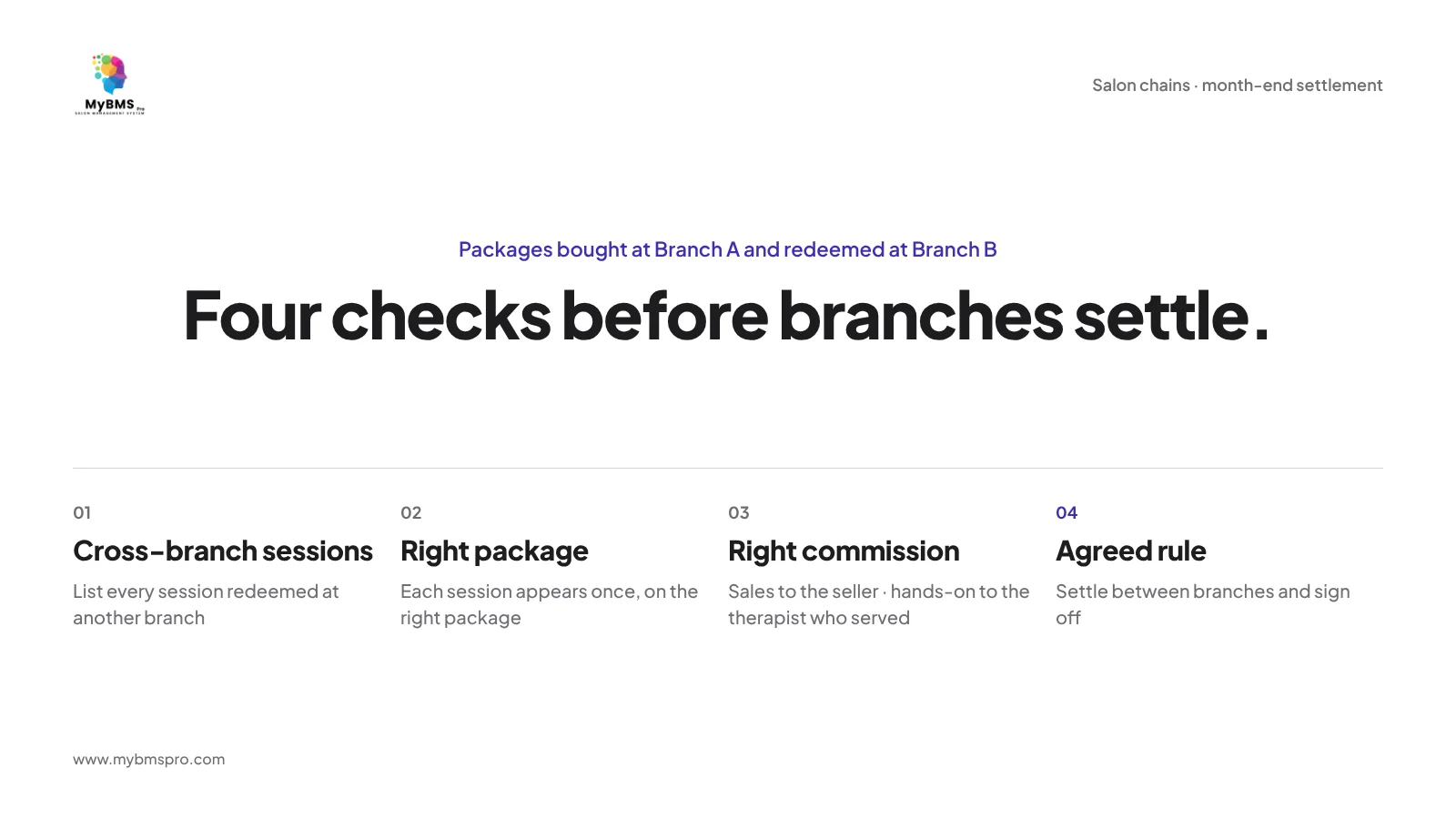
1. Close the month at every branch first
Before anyone looks at the settlement, make sure every session done this month has been redeemed in the system at the branch where it happened. A session still sitting on paper will be missing from every report.
2. List the sessions redeemed at a different branch
Start from the cross-branch settlement report. These are the only sessions that need a cross-branch check. Sessions sold and redeemed at the same branch follow your normal monthly routine.
3. Check each session against the package record
For each cross-branch session, open the customer’s package and look at the redemption history and the remaining sessions. The session should appear once, on the right package, and the remaining count should make sense. Learn more about tracking package balances.
4. Check that the sales commission stayed with the seller
The person who sold the package at Branch A earns the sales commission, based on the money actually collected. A session at Branch B should not move that sales commission to anyone else.
5. Check that the hands-on commission went to the therapist who served
The therapist who performed the session at Branch B earns the hands-on commission for that session. If the wrong therapist was recorded, find out why before commission is paid. The same logic applies inside one branch, as explained in one package sold by one staff and redeemed by another.
6. Apply the agreed rule and sign off
Use the rule you agreed earlier to settle between branches. The person named in the rule signs off, and the result is kept with the month’s records so nobody has to argue about it again next month.
7. Look for patterns, not only errors
If customers from one branch keep redeeming at another, that tells you something about location, opening hours or staffing. Treat the settlement report as a signal for planning, not only as an accounting task.
What to do when something does not match
- A session is missing. Check whether it was recorded on paper and never redeemed in the system. Fix the habit, not only the number.
- The customer still owes money on the package. Check the outstanding balance. Sales commission follows money actually collected, so the unpaid part should not count towards sales commission yet.
- The customer says she has used more sessions than the record shows. Show the redemption history from the same package record every branch uses.
How MyBMS Pro handles cross-branch settlement
MyBMS Pro is an AI-driven, next-generation SaaS management hub specifically designed for multi-branch beauty salons. For cross-branch settlement, these features work together:
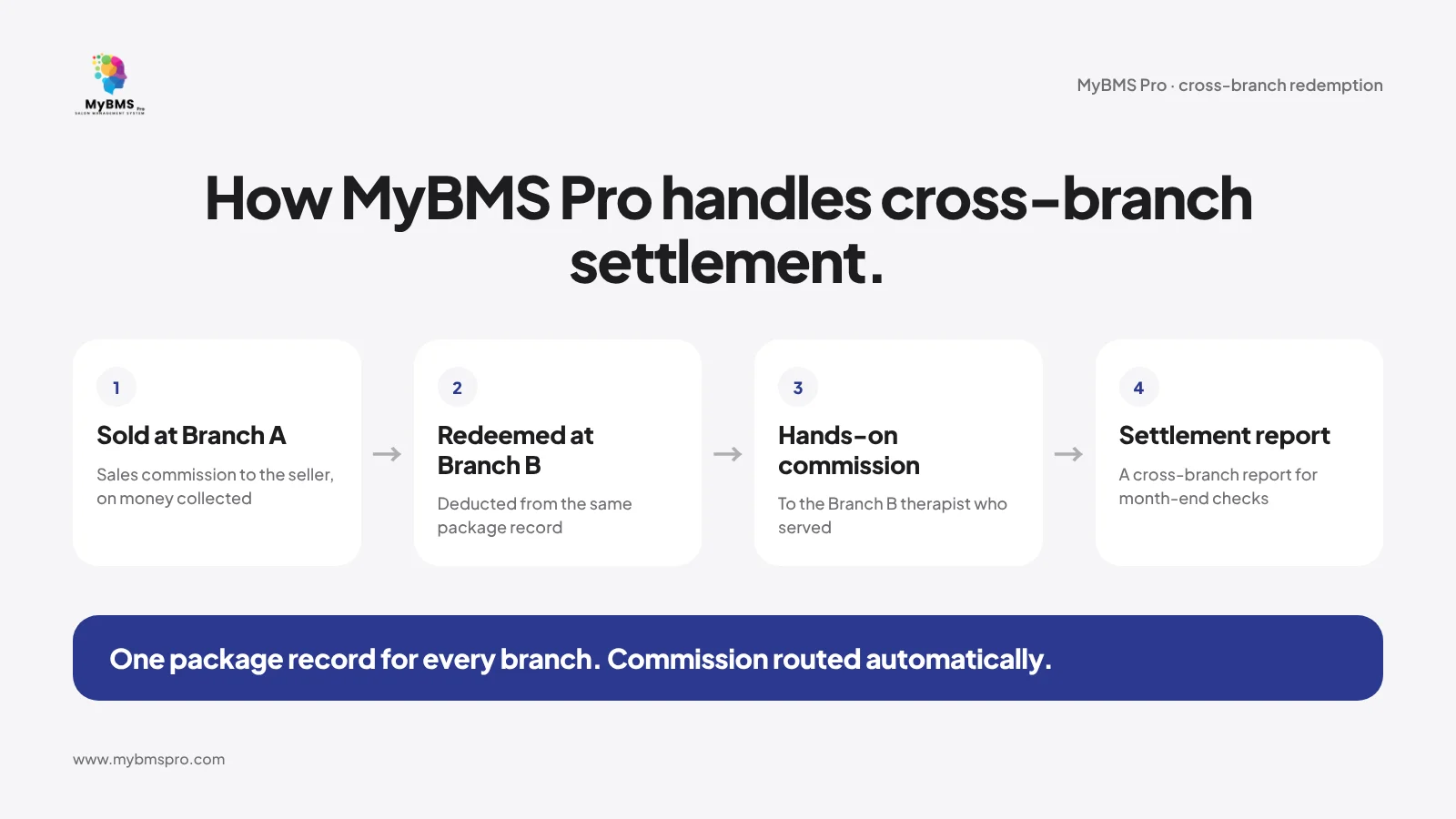
- Cross-branch redemption. A package bought at Branch A can be redeemed at Branch B. The system routes the sales commission and the hands-on commission automatically and generates a cross-branch settlement report.
- Package and treatment tracking. Each package shows remaining sessions, redemption history and any outstanding balance, and a session can be redeemed at the branch that sold it or at another branch.
- Two-track tiered commission. Sales commission is tiered on the total actually collected; hands-on commission is counted when a package session or service is redeemed.
- AI business dashboard. Owners can see daily traffic, sales trends, target achievement and outstanding balance details.
MyBMS Pro is a web-based system used in the browser. To see how HQ manages several branches, read how a multi-branch salon HQ manages its branches, or visit the beauty salon solution.
FAQ
What is a cross-branch settlement report?
It is a report of the sessions where a package was bought at one branch and redeemed at another, so the branches can check the sessions and commission and settle between themselves at month end.
How do multi-branch salons reconcile packages bought at one branch and used at another?
Keep one package record that every branch redeems from, list the sessions redeemed at a different branch, check each one against the package history, and settle using a rule agreed in advance.
Who gets the commission when a customer redeems a package at another branch?
The person who sold the package keeps the sales commission. The therapist who performed the session at the other branch earns the hands-on commission for that session.
Which branch gets the revenue when a package is sold at one branch and used at another?
There is no single correct answer. Agree a rule with your branch managers before the month starts, and use the settlement report to apply it.
Is there a MyBMS Pro mobile app?
No. MyBMS Pro is a web-based system used in the browser.
Make month-end settlement a review, not a rebuild
Want to see a cross-branch settlement report with your own branch setup? Book a free demo of MyBMS Pro and bring the way you settle between branches today.
See how MyBMS Pro runs bookings, POS, memberships and staff commission in one system — built for salons, spas, clinics and car grooming businesses in Malaysia.
Written by
William Tang · Founder & CEO, BMS Solution Sdn. Bhd.
William Tang is the founder of BMS Solution Sdn. Bhd., the Malaysian company behind MyBMS Pro. He works hands-on with salons, spas, clinics and car-grooming businesses across Malaysia, helping them move bookings, POS, memberships and staff management onto one cloud platform.